Mobile PDF manager combining conversion, editing, and signing tools
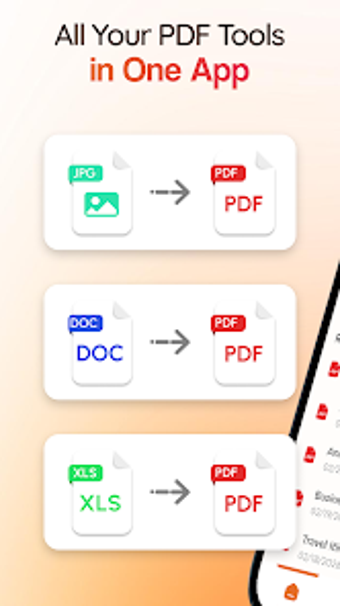
Converts Word, Excel and image files into PDFs, reverses PDFs to editable formats, and edits pages directly on Android devices. PDFEase: Converter Reader from VIP Y.K. packages a reader, format converters, merge/split tools, and annotation/signature functions into a single Android app. Key capabilities include multi-format conversion, page manipulation, and password protection. It is aimed at students, business professionals, and remote workers who need document handling on the go.
What professional document tasks it performs
PDFEase focuses on reading, converting, and reorganizing documents for mobile work. The app supports Word-to-PDF, Excel-to-PDF, and image-to-PDF conversions, plus the reverse operations PDF-to-Word and PDF-to-image. It also provides page-level operations such as merge, split, and compress, and a reader with page navigation, zoom, and bookmarking for reviewing final deliverables.
How it structures a mobile document workflow
The app groups reading, conversion, and editing within one workflow to keep files on-device. Editing tools let you insert text, images, and digital signatures; annotation tools add highlights and notes. Typical steps follow this pattern: open a file in the reader, apply conversions or page operations, then annotate and save the updated PDF for sharing or archiving.
Interface, onboarding, and target audience fit
Designed for Android, the interface aims for quick navigation and file organization and is pitched at students, business professionals, and remote workers. The developer optimizes the app for modern Android versions. The app's all-in-one approach reduces the need to switch apps during a single mobile session, which suits users handling multiple document types away from a desktop.
Compatibility, security, and output considerations
Compatibility centers on common office formats: Word, Excel, and standard image files convert to and from PDF without format loss claims in the source material. Security tools include adding or removing password protection, and the compress tool reduces file sizes for easier transfer. The app targets mobile fidelity and on-device document preparation rather than desktop-specific layout editing.
Who should adopt PDFEase and who should not
PDFEase is a practical mobile option for professionals and students who need to convert, edit, and sign documents on Android devices. It consolidates reading, conversion, and basic editing into one tool, which suits on-the-go workflows. Users requiring cross-platform desktop editing or specialized print-layout controls should expect mobile-focused capabilities rather than full desktop parity; the app is limited to Android environments.